Delete Your Account
We're sorry to see you go
Important Information
Before you proceed with deleting your Vine account, please note:
- Permanent Action: Account deletion is permanent and cannot be undone.
- Data Removal: All your profile information, photos, matches, and messages will be permanently deleted.
- Subscription: If you have an active subscription, please cancel it first to avoid future charges.
- Processing Time: Your account will be deactivated immediately, and all data will be permanently deleted within 30 days.
How to Delete Your Account in the App
Follow these simple steps to permanently delete your Vine account:
-
Open the Vine App
Launch the Vine app on your device and make sure you're logged in.
-
Go to Settings
Tap on your profile icon in the bottom navigation, then tap the settings icon in the top right corner.
-
Navigate to Account Settings
Scroll down to the "Account" section in the settings menu.
-
Select "Delete Account"
Tap on "Delete Account" option at the bottom of the Account section.
-
Confirm Deletion
Read the warning message carefully, then tap "Delete My Account" to confirm. You may be asked to enter your password for security verification.
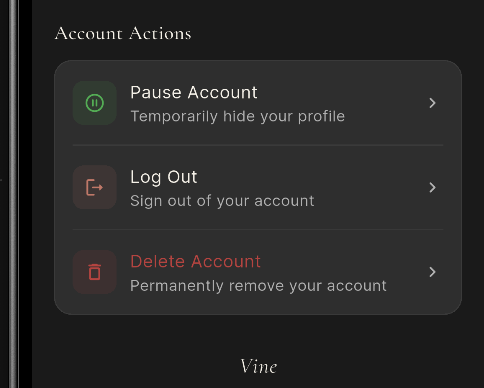
The account deletion option in your Vine settings
What Happens After Deletion
- Your profile will be immediately deactivated and hidden from other users
- Your matches will no longer be able to see or contact you
- All your conversations will be deleted from both your account and your matches' accounts
- Your photos and profile information will be permanently removed from our servers within 30 days
- You won't be able to recover any data after deletion is complete
Alternative Options
If you're not ready to permanently delete your account, consider these alternatives:
Take a Break
Hide your profile temporarily without losing your data. You can reactivate anytime by simply logging back in.
Adjust Your Preferences
Update your match preferences, distance settings, or notification preferences to improve your experience.
Contact Support
Have feedback or experiencing issues? Our support team is here to help at vine@appsbay.org
Need Help?
If you're experiencing technical difficulties or have questions about account deletion, please contact our support team:
- Email: vine@appsbay.org
- Response time: Within 24-48 hours